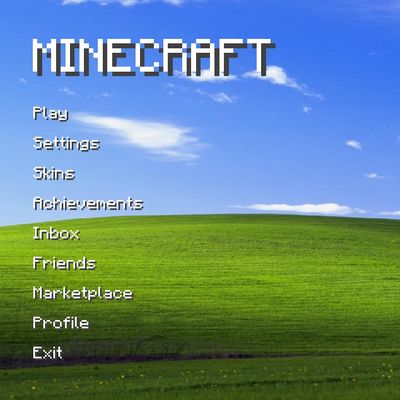


》WindowsXP Menu / Background《
Windows XP Wallpaper Background for Minecraft Bedrock/Pe
- Place the Pack at the top and don't forget to activate it in Global Resources so that the Pack can function optimally
- Compatible with most packs that change the background
Showcase:

- Subpacks: -
- Animation: -
How to download?
- CurseFoge go to "Files"
- MCPEDL scroll to the buttom
Thank you for download
Support me:)
⭐️⭐️⭐️⭐️⭐️
@PriaY
Quick facts
- Edition: Minecraft Bedrock
- File type: .mcpack
- Minecraft versions listed: 1.21.132, 26.0.02, 26.0
- How to install: Download the .mcpack. → Open it — Minecraft imports it under Resource Packs. → Activate it in Global Resources, or for one world under Resource Packs → Available.
- Where to get it: Opens on CurseForge — not every file is mirrored on our own servers.
Install steps are the general flow for this file type — How to install Minecraft Bedrock texture packs walks through it step by step.
Verified by MCModsHub
- Save it as !WindowsXP-Menu 1.0.mcaddon before opening — it downloads as .mcpack, but it is a .mcaddon pack
- Manifest requires Minecraft 1.16.0 or newer
- Complete pack — everything it depends on is inside the file
- Download size: 10.9 MB
- Download link checked 29 Aug 2026 — working
These come from our own check of the pack file, not from the source page.